To generate videos with AI, you start by feeding a platform like Aeon your existing content—think articles, blog posts, or even audio files. From there, the technology kicks in, automating the heavy lifting of script creation, voiceover generation, and sourcing visuals.
The result? You can slash production time and costs compared to the old-school, manual video workflow. This is how modern marketing and publishing teams are finally able to scale their video output without burning through their budgets.
Why AI Video Generation Is Reshaping Content Strategy
In the world of digital publishing, video isn't just a "nice-to-have" anymore; it's the main event. For years, the biggest hurdles to creating more video have been the eye-watering costs and painfully slow production timelines. A single, high-quality video could easily chew up days or even weeks, requiring a whole crew of scriptwriters, videographers, and editors. That workflow just doesn't fly when you need to keep up with the relentless pace of content today.

This is where AI video generation completely changes the game. It flips the model from slow and expensive to fast and scalable. Platforms like Aeon were built specifically to solve these problems, allowing publishers and marketing teams to turn their high-performing articles into a constant stream of compelling videos.
This isn't just about playing with new tech. It’s about building a modern content monetization engine that works at scale, turning your entire content library into a revenue-generating machine.
The Shift from Niche to Mainstream
What started as a niche experiment has exploded into a major commercial sector. The market for AI-driven video is booming, and it points to a fundamental shift in how we produce and consume content.
Industry reports estimate the global AI video generator market was around USD 614.8 million in 2024. But the real story is the growth—projections show it rocketing to USD 2,562.9 million by 2032. That’s a compound annual growth rate of about 20.0%, which is a massive signal that AI is no longer on the fringes; it's a core piece of any successful content strategy.
Meeting Audience Demand for Video
Let's face it: audiences have an insatiable appetite for video. It's more engaging, easier to digest on a phone, and primed for sharing on social media. For publishers, keeping up with this demand is non-negotiable for growth.
Just look at the benefits:
- Sky-High Engagement: Videos grab and hold attention far better than static text, which means longer time on page and more interactions.
- Massive Reach: Platforms like YouTube, TikTok, and Instagram are built on video. They offer a direct path to reaching entirely new audiences.
- New Revenue Streams: More video content opens the door to more ad revenue, sponsorships, and even e-commerce integrations.
By using tools that generate videos with AI, you can finally meet this demand without completely draining your team and resources. As you build your strategy, remember this: if content is king, then video volume is queen. Getting that combination right is what's driving success in digital publishing today.
Preparing Your Content for AI Video Transformation

Here's the secret to getting a great AI-generated video: it all comes down to the quality of the source material you feed the machine. The final video is a direct reflection of what you put in, which makes content prep arguably the most important step if you want to generate videos with AI that look truly professional.
Your source content—whether it's a blog post, a podcast transcript, or existing footage—is the blueprint. A rambling, disorganized article will inevitably lead to a choppy, confusing video. But a well-structured piece? That's your ticket to a coherent and engaging narrative.
Structuring Text for a Smooth Script Conversion
When you're turning an article into a video, the AI needs clear signposts to follow the flow and pick out the key messages. This is where long, dense paragraphs become your enemy. Your job is to make the text "scannable" for the AI, much like you would for a human reader who’s just skimming.
Start by breaking down those beefy paragraphs. Chop them into short, digestible chunks of just one to three sentences each. This simple trick helps the AI identify distinct ideas and create natural scene breaks in the video.
Next, focus on your subheadings. Instead of generic titles, write punchy, descriptive headings that actually summarize the section that follows. This gives the AI crucial context for selecting the right visuals and pacing the voiceover. For a deeper dive, check out our guide on writing video scripts that are already primed for production.
Your source article's structure is the foundation of the video's narrative arc. Every subheading acts as a chapter marker, guiding the AI from one key point to the next, ensuring the final video tells a clear story.
Organizing Your Assets for Coherence
A standout AI video is about more than just the text. It's about giving the AI a cohesive package of assets it can easily interpret. Using an AI video script writer for initial drafts can really help streamline this whole process.
Before you hit "generate," here's a quick rundown of what you should do to get your inputs ready:
- Flag Key Quotes: Find the most powerful quotes or stats in your text. These make fantastic on-screen callouts. You can flag them for the AI simply by using blockquotes or bolding them in your source document.
- Prioritize a Logical Flow: Make sure your article has a clear beginning, middle, and end. The AI will follow this sequence to the letter, so a logical narrative is non-negotiable for a video that makes sense.
- Provide Visual Cues: Got specific images, charts, or video clips you want to see? Make a note of where they should go directly within your text. This gives the AI explicit instructions and cuts down on manual edits later.
This prep work is what separates the disjointed, amateur-looking AI videos from the high-quality, professional content that actually grabs an audience's attention. It puts you in the driver's seat.
To make this even easier, here's a quick reference checklist.
Input Content Preparation Checklist
This table breaks down the key steps to get your text, audio, and video inputs ready for the AI, ensuring a much better final product.
Taking a few minutes to run through this checklist is a small time investment that pays off big in the quality of the videos you generate.
Embedding Your Brand and Voice into AI Videos

Let's be honest: automation shouldn't strip your brand of its personality. When you generate videos with AI, the real win is producing content that feels distinctly yours, not something that came off a generic, robotic assembly line. This is exactly what platforms like Aeon are built for, giving you deep, granular control over both the audio and visual feel of every single video.
This level of customization is everything because consistency is what builds trust with your audience. They know your voice, your colors, your on-screen vibe. Sacrificing that for the sake of speed is a bad trade. The good news is, you don't have to. You can scale your video output while actually reinforcing your brand identity with every clip.
Defining Your Signature Sound
The voiceover is often the most human part of a video, so it's absolutely critical to get it right. Aeon starts you off with a massive library of AI narrators, covering a huge range of accents, tones, and speaking styles. You can easily pick a voice that perfectly captures the mood—whether that's authoritative for a news brief or warm and friendly for a tutorial.
But for brands that want to take it a step further, voice cloning is a game-changer.
Imagine an AI narrator that sounds exactly like your company's CEO, a trusted podcast host, or a specific brand ambassador. This creates a signature sound that is instantly recognizable and 100% unique to you, making your automated videos feel incredibly personal.
By establishing a consistent audio identity, you're not just creating a video; you're building an auditory brand signature that resonates with your audience across every piece of content.
This level of control means your brand’s voice stays authentic and consistent, even when you're producing content at scale.
Building a Visual Brand Kit for Consistency
Your visual branding is just as crucial as the audio. To keep a cohesive look across all your videos, you can build out a comprehensive brand kit right inside Aeon that your whole team can tap into. This is where you lock in all the core visual elements of your brand identity.
- Logos and Watermarks: Upload your primary and secondary logos so they can be placed automatically on every video.
- Color Palettes: Define your brand's core color scheme for backgrounds, text overlays, and other graphic elements.
- Typography: Set your default fonts and text styles to ensure all on-screen text matches your brand guidelines perfectly.
- On-Screen Graphics: Create and save templates for things like lower thirds, title cards, and call-to-action banners for consistent use.
Let's talk economics for a second. The high cost of traditional studio workflows—often thousands of dollars per minute with days of turnaround time—is a huge reason publishers are embracing these tools. AI generators flip that script, letting you pump out massive amounts of content at a fraction of the cost. Market research backs this up, as detailed in this breakdown of the AI video generator market.
Ultimately, this makes creating a unified, professional look across hundreds or even thousands of videos not just possible, but incredibly straightforward.
Building Automated Workflows for Social Media
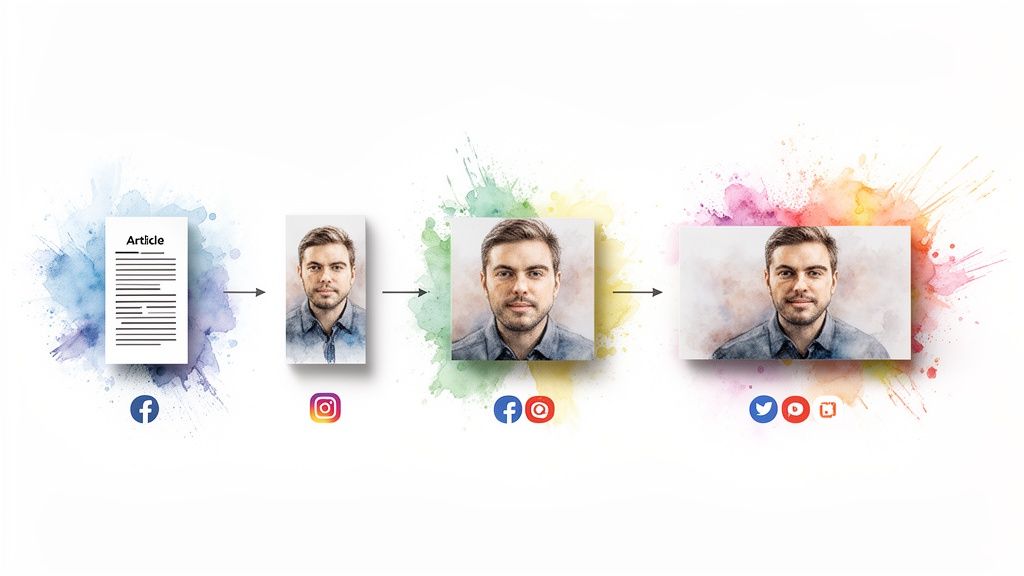
True efficiency isn't just about making one video faster. It’s about building a system where a whole suite of video assets are generated automatically from a single piece of content. This is where smart automation stops being a simple time-saver and becomes a real strategic advantage for your social media presence.
The goal is to squeeze every last drop of value out of each article you publish by turning it into a collection of social-ready videos, tailored for every platform.
Imagine this: you hit ‘publish’ on a new blog post. Within minutes, without anyone lifting a finger, Aeon delivers a vertical video for Instagram Reels, a square version for your LinkedIn feed, and a traditional landscape cut for YouTube. Each version is perfectly formatted and ready to go, meeting your audience right where they are. This isn't some far-off dream—it's a practical workflow you can set up today.
Configuring Multi-Format Outputs
The heart of this strategy is setting up smart rules within your video generation platform. Instead of creating videos one by one, you build a workflow that automatically triggers different outputs based on that first piece of content you feed it.
Think of it as your own personal content distribution machine. You set the rules that govern how each video gets made, ensuring everything stays consistent and relevant for each social channel.
- Aspect Ratios: Configure the system to automatically pump out videos in 9:16 (vertical), 1:1 (square), and 16:9 (landscape).
- Duration Limits: Set time constraints to create short, punchy edits for platforms like TikTok (say, under 60 seconds) while letting longer summaries run on YouTube.
- Branding Variations: You can even apply different branding or calls-to-action depending on the platform. Maybe a "Link in Bio" graphic for Instagram and a "Subscribe" end card for YouTube.
By automating the creation of multiple formats, you're not just repurposing content—you're strategically adapting it to fit the native experience of each social media platform. That’s what really drives engagement.
This systematic approach frees your team from the mind-numbing task of manually reformatting videos. This saves countless hours that can be poured back into what really matters: strategy and creative development. To go deeper, check out these proven strategies to automate video creation and give your team’s productivity a serious boost.
Practical Automation Scenarios
This kind of workflow isn't just for publishers. The applications are incredibly versatile across just about any industry you can think of.
An e-commerce brand, for example, could automatically generate product demo videos directly from a product description page. One text input can become a whole series of social ads, a tutorial for YouTube, and a quick feature highlight for Instagram Stories. Suddenly, you're showcasing your products across multiple touchpoints without a massive production budget.
In the same way, a newsroom can transform a breaking news article into a social-ready video summary in minutes. This lets them be the first to share visually engaging updates on platforms where people are increasingly getting their news. The speed and scalability you get when you generate videos with AI this way is a massive competitive advantage in a fast-moving news cycle.
Using Editorial Controls to Refine and Optimize
Automation gives you incredible speed and scale, but let's be honest—that final polish still needs a human touch. This is where your editorial controls become your most valuable asset.
Think of it this way: AI gets you 90% of the way there in a matter of seconds. Your job is to handle that crucial last 10% that ensures brand safety, narrative accuracy, and maximum impact.
This human-in-the-loop approach is non-negotiable for us. It’s your chance to review the AI’s choices and make the small tweaks that align the video perfectly with your strategy. Without this step, you risk publishing content that feels just a little off, undermining all the efficiency you just gained.
Fine-Tuning Your AI-Generated Video
Once Aeon hands you the first draft, it’s time to step in as the director. The great thing is, you don’t need to be a professional video editor to make meaningful changes. The interface is designed for intuitive, scene-by-scene adjustments, giving you precise control over the final cut.
Here’s a quick checklist of what to look for:
- Adjusting On-Screen Text: Is the text too long for the scene? Are there awkward line breaks? You can easily shorten sentences or emphasize key phrases to make everything more readable.
- Swapping Out B-Roll: Sometimes the AI picks a visual that doesn’t quite hit the mark. No problem. Swap it out with a single click from the media library or by uploading your own branded assets.
- Fine-Tuning Scene Timing: If a scene feels rushed or drags on, you can adjust its duration to match the pacing of the narration. This simple tweak makes for a much smoother viewing experience.
If you want to dive deeper into the nuts and bolts of editing, this AI video editing guide is a fantastic resource for learning some more advanced techniques.
Think of this as a collaboration. The AI handles the heavy lifting of the initial assembly, while you provide the critical creative oversight to perfect the final narrative.
Optimizing for Clicks and Conversions
Refining the video is only half the battle. Now you have to get people to actually watch it. This means optimizing not just the video, but all the metadata that surrounds it.
First up, the thumbnail. This single image can make or break your click-through rate. Use your editorial controls to A/B test a few different options. Try a frame from the video with a bold text overlay versus a custom-designed graphic to see what your audience responds to.
Next, craft an SEO-friendly video title and description. Pack them with keywords your audience is actually searching for.
Finally, don’t forget to add a powerful call-to-action directly in the video. These overlays can prompt viewers to subscribe, visit your website, or check out a product—turning passive viewers into active leads and customers.
Got Questions About AI Video? We've Got Answers.
As more publishers and marketing teams look into generating videos with AI, a lot of the same questions tend to pop up. Moving from the familiar grind of traditional video production to an automated workflow can feel like a huge leap, but it’s usually more straightforward than you think.
We've gathered the most common questions we hear and laid out some clear, practical answers. Think of this as your field guide to figuring out how AI video fits into your content strategy.
Can AI Really Make a High-Quality Video from Any Article?
This is a big one. While AI is incredibly powerful, the old rule still applies: garbage in, garbage out. The quality of your final video is directly tied to the quality of the article you feed it.
AI shines when it's working with well-structured content that has a clear, logical flow. Articles with distinct sections, descriptive subheadings, and tight, focused paragraphs are the perfect candidates for a video makeover.
For instance, these formats convert beautifully into video:
- How-to guides with clear, sequential steps.
- Listicles that break down information into easy-to-digest points.
- News reports that lay out the facts in a straightforward, chronological way.
What about more abstract or opinion-driven pieces? You might need to give the AI a more direct script or a sharp summary to work from. Platforms like Aeon are built to understand structure, so breaking down complex ideas into key takeaways will always give you a better, more engaging video.
How Much Creative Control Do I Actually Have?
You have a ton of control—way more than most people expect. Modern AI video generators aren't some rigid black box that spits out a video you’re stuck with. The process is really a collaboration between the AI and a human editor, and you always have the final say.
The AI does the heavy lifting—drafting the script, assembling scenes, syncing the voiceover, and finding initial visuals. Your job is to step in and add that final creative polish, making sure the video is perfectly on-brand and hits all the right notes for your campaign.
You can typically customize just about everything. Change the narrator's voice, swap out the background music, tweak the on-screen text, add your branding, and hand-pick the b-roll footage for every single scene. Your unique vision never gets lost in the process.
Is This Going to Be a Nightmare to Integrate into Our Workflow?
For most teams, plugging AI video into their existing process is surprisingly smooth. The best platforms are designed to fit right into modern content workflows, not blow them up. You can often kick things off just by dropping in the URL of an article you want to convert.
The key is to see this technology as an extension of your content team, not a replacement for it.
The teams that see the most success usually designate a point person or a small group to own two key stages:
- Prepping the inputs: A quick check to make sure articles are well-structured.
- Reviewing the outputs: Giving each video that final editorial polish before it goes live.
By defining these roles, generating videos with AI quickly becomes a natural part of your publishing routine. It’s about adding a powerful new gear to your content engine, not adding a bunch of complexity. This is how you start scaling video production without sacrificing the quality your audience loves.
Ready to see how fast you can turn your articles into engaging videos? With Aeon, you can build automated workflows that save time, scale your social media presence, and drive real results. Start creating with Aeon today and transform your content strategy.