Before a single word hits the page, the best voice-over scripts are already halfway done. The real work happens upfront, in the planning. It's the difference between a script that just fills airtime and one that actually gets results.
You wouldn't build a house without a blueprint, right? Same principle applies here. Nailing down your strategy first saves a ton of time on rewrites and makes sure the final video connects with your audience.
Laying the Groundwork for a Powerful Script
Every great script is built on three pillars: your message, your audience, and your goal. Get these right, and the writing almost takes care of itself.
Define Your Core Message
First things first: what's the one thing you absolutely need your audience to walk away with? If they only remember a single idea from your video, what is it?
This is your core message. It needs to be simple, clear, and the guiding star for everything else you write. It's tempting to cram every last detail into a video, but that's a classic mistake. A script that tries to say everything usually ends up saying nothing at all. Focus on landing one powerful idea, and you've already won half the battle.
This whole process is about getting these three core elements to work together.
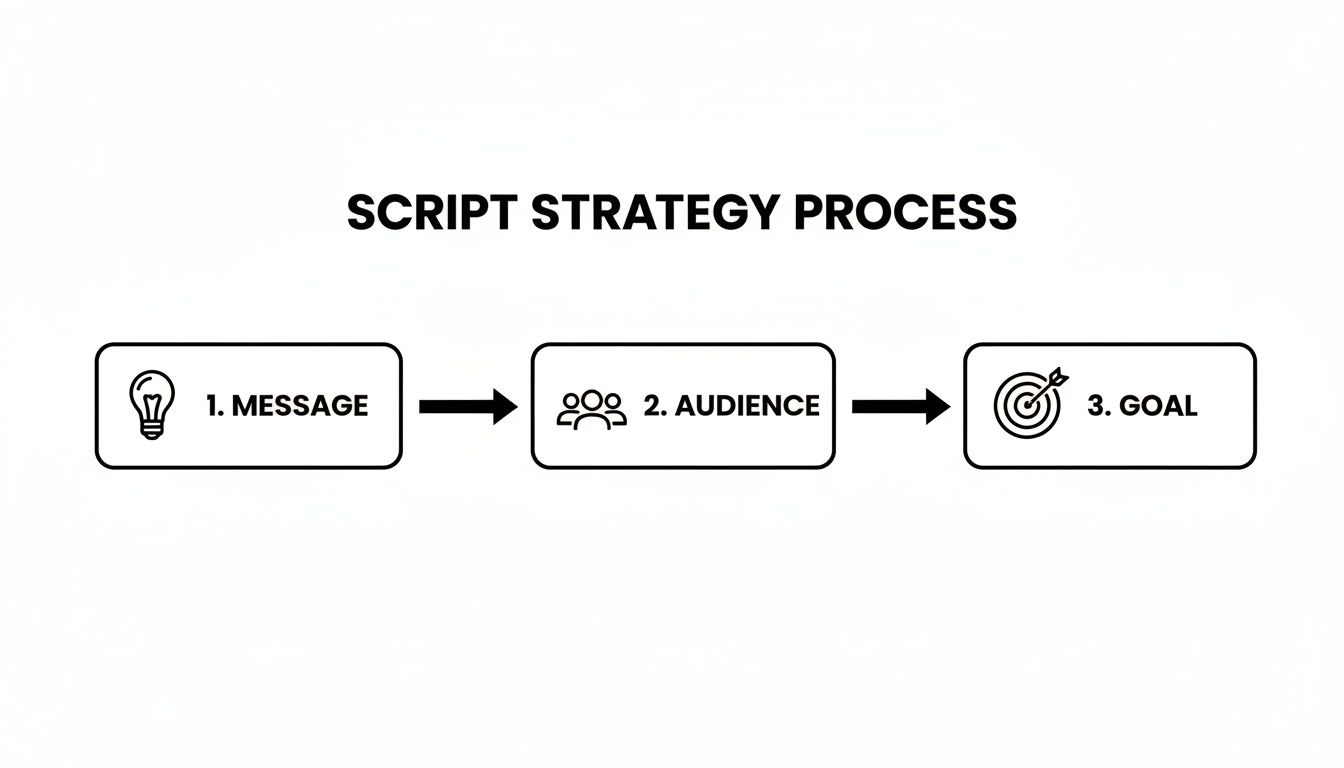
Think of it this way: every word, every pause, and every tonal shift should serve your message, connect with your audience, and drive them toward your goal.
Understand Your Target Audience
Okay, who are you actually talking to? This question changes everything—your tone, your language, the examples you use. A script for a group of software engineers is going to sound completely different from one aimed at new parents.
Take a minute to sketch out a quick profile of your ideal viewer:
- Who are they? Think about their age, job, and where they live.
- What do they already know? Are they experts on this topic or total beginners?
- What’s their problem? How does your video make their life easier?
- How do they talk? Do they appreciate a more formal, buttoned-up style, or are they looking for something casual and friendly?
When you answer these questions, you stop writing at people and start talking with them. That's how you build a real connection. If you're just starting out, getting a handle on the basics is crucial; this ultimate beginner's blueprint on how to do voiceovers is a great place to start.
A script written for everyone is a script written for no one. True connection happens when you tailor your message to a specific group, addressing their unique needs and speaking their language.
Set a Clear Call to Action
Every video needs a purpose. What do you want people to do when it’s over? This is your call to action (CTA), and it can't be an afterthought. A vague or missing CTA is like telling a great story with no ending—it just leaves people hanging.
Your goal could be anything. Maybe you want to drive sales, or maybe you're just trying to educate your team. Be specific.
- For a commercial: "Visit our website to get 20% off today."
- For an explainer: "Sign up for a free trial to see how it works."
- For a training video: "Complete the quiz to test your knowledge."
A strong CTA gives your audience a clear next step, turning them from passive viewers into active participants. When you're crafting a high-converting script for advertising, the CTA is everything. The entire script should build momentum toward that final, simple instruction.
To make this even easier, use this quick checklist before you start writing.
Voice Over Script Pre-Writing Checklist
This table is your strategic blueprint. Fill it out before you write a single line of your script to ensure every word has a purpose.
Once you have clear, concise answers in each of these columns, you're not just writing a script—you're executing a strategy.
Formatting Your Script for a Flawless Performance
A well-structured script is so much more than just words on a page. It's the single most important tool you can hand over to a voice artist and the entire production team. Think of it as a universal blueprint that ensures everyone—from the actor to the video editor to the sound designer—is on the same page.
Getting the formatting right eliminates guesswork, slashes the need for expensive studio retakes, and is pretty much the secret to a professional, polished final video.

This kind of attention to detail is what makes the entire creative process run smoothly.
The Industry Standard Two-Column Format
If your project involves any kind of visuals, the two-column Audio/Visual (A/V) script is non-negotiable. It’s the gold standard for a reason. It’s clean, intuitive, and instantly shows how the sound and picture are meant to sync up. For explainer videos, commercials, or training modules, this is the only way to go.
Here’s the basic setup:
- Create a two-column table. The left column is for VISUALS, and the right is for AUDIO.
- In the VISUALS column, briefly describe what's happening on screen. Keep it concise but clear. Think simple descriptions of shots, on-screen text (often called chyrons), and any key actions.
- In the AUDIO column, write out everything that will be heard. This means the narrator’s lines, any dialogue, music cues, and sound effects.
This side-by-side layout gives the whole team a clear, moment-by-moment guide. The editor knows exactly which shots to match with the narration, and the voice actor can time their performance to the on-screen action perfectly.
Adding Essential Performance Cues
Your script shouldn’t just list words; it needs to convey feeling. The voice actor can't read your mind, so you have to give them clear directions on how you want the lines delivered. These are called performance cues, and you usually pop them in parentheses right before the line they apply to.
Use these cues to guide the delivery:
- Tone:
(Warm and friendly),(Urgent and energetic),(Authoritative) - Pacing:
(Slight pause),(Speaking quickly),(Deliberate and slow) - Emotion:
(Excited),(Concerned),(Playful) - Emphasis: You can also bold or italicize specific words you want the actor to stress.
A great voice-over script is like a piece of sheet music for the spoken word. The notes are the words, but the directions for tempo, volume, and emotion are what turn it into a memorable performance.
A word of caution: don't overdo it. Cues on every single line can feel restrictive and stifle an actor's natural creativity. Use them strategically at key moments to set the overall mood and highlight the most critical parts of your message.
Incorporating Sound and Music
Sound design can make or break a video, and your script is the place to start planning for it. Clearly label all your sound effects (SFX) and music cues so the audio engineer knows exactly what to add and when.
I always recommend writing these cues in all caps—it makes them jump off the page and impossible to miss.
- For sound effects:
[SFX: GENTLE WHOOSH AS LOGO APPEARS] - For music:
[MUSIC: UPBEAT, INSPIRATIONAL TRACK FADES IN]or[MUSIC: FADES OUT]
Placing these directly in the audio column at the exact moment they should happen creates a comprehensive audio plan. It’s a simple step that prevents a world of confusion later and ensures the final sound mix is perfectly aligned with what you envisioned.
This level of detail is becoming even more critical now. The global script writing software market was valued at around USD 140.24 million in 2024 and is set to grow quite a bit. This is driven by the need for precisely timed and formatted scripts that plug right into modern production workflows. Producers rely on scripts that follow standard timing conventions—like a conversational pace of 140–160 words per minute—to accurately budget studio time and talent fees. You can find more insights on the growth of the script writing software market to see where the industry is headed.
Finding the Right Rhythm and Pace
Timing is everything in a voice-over script. It’s the invisible force that makes your message land with impact, not with a thud. Poor pacing makes a 30-second spot feel like an eternity, while a well-timed script can hook an audience from the very first word.
Mastering this is all about turning words on a page into a natural, engaging performance. It’s also about understanding the critical link between your word count and the final runtime. A script that runs even a few seconds too long can cause massive headaches in post-production, especially for those tightly-timed social media clips.
Understanding Words Per Minute
The bedrock of timing your script is understanding Words Per Minute (WPM). Think of it less as a rigid rule and more as a flexible guideline that helps you ballpark how long your script will take to read aloud. Different delivery styles demand different speeds.
It all comes down to the feeling you want to create:
- Energetic and Urgent (150-180 WPM): This is your go-to for commercials, high-energy promos, and social media ads. The faster pace creates a sense of excitement and drives action.
- Conversational and Informative (140-160 WPM): Most explainer videos, e-learning content, and corporate presentations live here. It feels natural, authoritative, and is easy for the audience to follow.
- Calm and Deliberate (120-140 WPM): Perfect for documentaries, audiobooks, or videos with a more emotional tone. A slower pace lets the listener soak in complex information and really connect with the story.
Knowing these benchmarks before you start writing saves a lot of pain later. For instance, if you're aiming for a 60-second video with a friendly, conversational tone, you should be targeting a script of about 150 words.
Pacing is the heartbeat of your script. It's the deliberate variation in speed and silence that creates suspense, emphasizes key points, and keeps the listener leaning in for more.
The Rise of Short-Form Content
The demand for tight, powerful scripts has absolutely exploded, thanks mostly to short-form video on platforms like TikTok and Instagram. Scripts for 20–30 second ads, often containing just 40–75 words, are a huge part of the commercial voice-over landscape now.
In fact, a 2023 survey found that 66% of full-time voice actors said internet ads were their most commonly booked job. This just goes to show how much brands are prioritizing short, punchy scripts built for mobile feeds. For us writers, that means every single word has to earn its place. The script needs to deliver a clear message and a strong call-to-action almost instantly. You can read more about the trends shaping the voice over industry to get a better sense of this market shift.
How to Time Your Script as You Write
Timing shouldn't be something you fix at the end. It needs to be part of your writing process from the get-go. Trust me, integrating timing checks as you write will save you from having to kill your darlings later.
Here are two dead-simple methods I use constantly:
- Read It Aloud: This is the golden rule of scriptwriting. Seriously. When you finish a section, read it aloud at the pace you envision. Use the stopwatch on your phone. Does it flow? Are there any clunky, tongue-twisting phrases? This simple act exposes awkward wording and timing issues immediately.
- Use an Online Calculator: For a quick sanity check, pop your text into a free "words to time" online calculator. Just paste your script, select a target WPM, and it’ll spit out a rough runtime. It’s perfect for early drafts to make sure you're in the right ballpark.
Remember, these are just estimates. The final read will always depend on the voice actor’s unique delivery, but these techniques will get you incredibly close.
Using Pauses to Create Impact
Great pacing isn't just about speed; it's also about knowing when to shut up. Strategic pauses are one of the most powerful tools you have. They’re not just dead air—they’re a way to command attention.
- Emphasize a point: A brief pause right before or after a key message is like a non-verbal cue that tells the listener, "Hey, this part is important."
- Allow for absorption: When you're dropping complex info or an emotional line, a pause gives the audience a beat to process what they just heard.
- Build suspense: In storytelling, a well-placed pause can create incredible anticipation, pulling the listener right to the edge of their seat.
- Sync with visuals: Often, you just need to leave some room for an animation to play out, a graphic to pop up, or a scene to change.
I always mark these in my scripts with simple cues like (pause) or (beat). This tiny instruction is a huge signal to the voice actor, letting them know they can use silence to make the final video more dynamic and impactful.
Adapting Your Script for Different Channels
A script that works wonders in a corporate training video will absolutely bomb as a TikTok ad. It's a hard truth, but the context where your audience hears your message is just as important as the message itself. Knowing how to write a voice-over script that you can tweak for different channels is one of the most valuable skills you can have as a creator.
Think about it: the same core idea often needs to be packaged in completely different ways. A deep-dive video on YouTube can easily run ten minutes and be packed with detail. But its Instagram Reel counterpart? You've got less than 30 seconds to land the same point. This isn't just about cutting down your word count; it’s about completely rethinking the story to fit the platform and, more importantly, the audience's attention span.

Tailoring for Social Media Versus Professional Settings
When you start adapting a script, get inside the viewer's head. Someone doom-scrolling on social media is in pure discovery mode. You have to hook them immediately with something punchy, energetic, and informal. On the other hand, an employee watching a required training module is a captive audience. They're expecting a clear, professional, and more measured delivery.
Here are a few practical adjustments I always make:
- Social Media (Instagram, TikTok): The tone has to be super conversational. I like to open with a question to grab attention and always get to the main point within the first three seconds. Scripts here are brutally short, often under 75 words.
- YouTube: This is where you can let your personality shine and go deeper. The tone can be educational, entertaining, or a blend of both. While the length is flexible, that intro is still everything—you have to convince them to stick around.
- Corporate/E-learning: Clarity and authority are king. The language needs to be precise and free of jargon, with a steady pace that helps people actually absorb the information.
As you think about delivering your script across these platforms, it's worth looking into how AI voice generators can turn your text into a natural-sounding voice-over. This tech is a game-changer for quickly creating different audio versions to match each channel's vibe. For a deeper dive, check out our guide on using text-to-speech for videos.
Your script’s tone isn’t just about what you say, but how you say it. A simple change from "We will now demonstrate the procedure" to "Let me show you how this works" can completely alter the viewer's connection to the material.
Writing for a Global Audience
With content now reaching viewers all over the world, writing a "global-ready" script isn't a niche skill anymore—it's essential. Just throwing your script into a machine translator is a recipe for disaster. It misses cultural nuances, context, and the natural rhythm that makes a language feel real.
Localization is a massive part of the voice-over market now, especially with the boom in streaming and global e-learning. In fact, demand for localized content is so high that the Asia-Pacific media market alone is projected to hit USD 1.21 trillion by 2025. This trend forces writers to think differently. For instance, a translated line of dialogue can be anywhere from 10–25% longer or shorter, which can completely throw off your video's timing.
To make your script translation-friendly, keep these best practices in mind:
- Ditch the Idioms and Slang: Phrases like "hit the ground running" or "bite the bullet" almost never translate well and just end up causing confusion. Stick to clear, universal language.
- Keep Sentences Simple: Long, complex sentences are a nightmare to translate accurately. Break down your big ideas into shorter, more direct sentences.
- Leave Some Breathing Room: Be aware that some languages, like German, tend to use more words than English. I always build extra pauses into my script to account for this "language expansion." It keeps the foreign voice actor from having to rush through their lines.
- Add Cultural Notes: If your script has specific cultural references or brand jargon, leave a quick note for the translator. This little bit of context helps them find the perfect local equivalent.
How to Edit Your Script Like a Pro
Your first draft isn't the final product; it's the raw material. The real magic, the part where a script goes from just okay to genuinely powerful, happens in the edit. This is where you sharpen your message, polish every line for performance, and turn good ideas into something that truly connects with the listener.
Editing is so much more than just catching typos. It’s about listening with a critical ear, cutting anything that doesn't serve the story, and making sure every single word earns its place. A tight, well-edited script is a gift to the voice artist and, more importantly, a much better experience for your audience.
The Golden Rule: Read Everything Out Loud
If you only do one thing on this list, make it this one. Reading your script aloud is the fastest way to find out what works and what doesn't. You will immediately catch awkward phrasing, clunky sentences, and words that look fine on paper but are a nightmare to say.
Your ears will pick up on problems your eyes will completely miss. Does the rhythm feel natural? Are the sentences so long you're left gasping for air? This simple test is your first and best line of defense against a script that sounds robotic.
A script is a performance on paper. If it's difficult for you to say it naturally while sitting at your desk, it will be ten times harder for a voice actor to deliver it flawlessly in a recording booth.
Trim the Fat for Maximum Impact
Every script is fighting against the clock. Whether it’s a 30-second ad or a 5-minute explainer video, you have to be ruthless about cutting unnecessary words. This isn’t just about hitting a time limit; it’s about making your message more potent.
Focus on getting rid of words that don't add real value:
- Filler words: Ditch phrases like "in order to," "basically," and "that being said."
- Redundancies: You don't need to say "completely finished" or "added bonus." They mean the same thing.
- Weak adverbs: Weak verbs often need an adverb to prop them up. Instead of "walked slowly," try "strolled" or "ambled."
This process forces you to be more precise and choose stronger language. The result is a script that is clearer, more direct, and respects your audience's time.
Simplify Your Language for Clarity
Complex vocabulary and industry jargon are the enemies of a good voice-over script. Your goal is instant comprehension. The audience shouldn't have to hit pause and google a term; the message needs to land effortlessly.
Go through your script sentence by sentence and ask, "Is there a simpler way to say this?"
-
Instead of: "We will now commence with the implementation..."
-
Try: "Now, we’ll start setting up..."
-
Instead of: "Utilize this feature to enhance productivity."
-
Try: "Use this feature to get more done."
Writing for the ear is all about conversational language. Use contractions like "it's" and "you'll." This tiny change makes a massive difference in how natural and relatable your script feels.
Before you call it done, run through this quick checklist. It helps you catch those last few things that can make a huge difference in the final recording.
Voice Over Script Editing Checklist
Taking a few extra minutes to go through these steps can elevate your script from good to great.
Get a Fresh Perspective
After you've stared at the script for hours, you're too close to it. You know what it's supposed to mean, which can make you blind to confusing spots. This is the perfect time to bring in a fresh pair of eyes—and ears.
Ask a colleague or a friend to read it back to you. The key is to not give them any context beforehand. Just listen. Pay attention to where they hesitate, stumble, or ask questions. Those are the exact spots that need another look. This feedback is absolute gold.
For writers looking to speed up this refinement process, exploring how a scriptwriting AI can enhance your scriptcraft can provide new perspectives and suggestions. Following these proven editing steps will elevate your script from good to truly great.
Common Voice Over Script Questions
Even the most seasoned writers run into questions when tackling a new voice over script. Getting a handle on these common sticking points can save you a ton of time and make the whole process feel less like a chore.
We've pulled together the questions we hear all the time to help you get over those final hurdles and lock in a script you can be proud of.
How Long Should a 1 Minute Voice Over Script Be?
For a typical, conversational video, you should aim for about 140 to 160 words for a one-minute script. That’s a comfortable speaking pace that works for most explainers, corporate videos, and e-learning content.
Of course, the tone changes everything. If you're writing a high-energy ad, you might be able to squeeze in 160 to 180 words. On the flip side, a slower, more dramatic piece like a documentary might need to be closer to 130 words to let the message sink in.
There's only one way to know for sure: read your script out loud with a stopwatch. This simple check turns a good guess into a hard number and can save you from a world of pain in the editing room.
What Is the Best Format for a Voice Over Script?
The gold standard is the two-column Audio/Visual (A/V) script, hands down. It’s what nearly every professional uses for projects with visuals because it keeps what’s seen and what’s heard perfectly in sync.
Here’s how it works:
- Left Column (Visuals): This is where you describe everything the audience sees—shots, graphics, text on screen, you name it.
- Right Column (Audio): This column is for all the audio elements: the spoken script, sound effects (SFX), and any music cues.
Each row represents a single moment in the video, making it crystal clear for the voice artist, editor, and anyone else on the production team. If you're working on an audio-only project, like a podcast or radio spot, a simple single-column script will do the job just fine.
What Are the Most Common Mistakes to Avoid?
It's easy to fall into a few common traps when you're starting out. Just knowing what they are is half the battle.
Here are three of the biggest mistakes we see:
- Writing for the Eye, Not the Ear: We're trained to write formally, but scripts filled with dense sentences and jargon just sound clunky and unnatural when spoken. Always write like you talk.
- Forgetting About the Clock: A script that runs long is a production nightmare. You have to be ruthless about timing. Check it as you write, then check it again when you edit.
- Leaving the Voice Actor in the Dark: If you don't include notes on the tone, emotion, or pacing—like
[warm and friendly]or[urgent]—you're forcing the talent to guess. Give them a clear roadmap so they can deliver the performance you're imagining.
How Do I Make My Script Sound Natural?
If you want your script to sound genuinely conversational, you need to write that way from the start. Use everyday language and don't be afraid of contractions like "you're," "it's," and "can't." That's how real people talk.
Keep your sentences short and to the point. If you have a complicated idea, it's always better to break it down into two or three simpler sentences instead of one long, winding one.
But the most important trick is to read every single word out loud. If a line feels awkward rolling off your tongue, it will sound ten times worse in the final recording. Just pretend you're explaining the idea to a friend over coffee—that simple mental shift is often all it takes to find a natural, engaging voice.
Ready to turn your perfectly written scripts into compelling videos effortlessly? With Aeon, you can transform your text into engaging video content at scale, complete with custom voices and automated formatting for every channel. Discover how Aeon can automate your video production today.