
Ever heard someone mention 4K or 1080p and just nodded along? Let’s break down what video resolution actually means. At its core, video resolution is just a simple way of describing how much detail is packed into your video.
Think of it this way: more pixels mean a sharper, more detailed image. It's why a modern 4K video looks breathtakingly clear, while an old 720p clip can feel a bit fuzzy by comparison.
So, What Exactly Is Video Resolution?

Imagine your video screen is a giant mosaic built from millions of tiny, colorful tiles. Each of those little tiles is a pixel—the smallest single dot of light that makes up a digital picture. Video resolution is simply the total count of these pixels, arranged in a grid across the screen's width and height.
So when you see a resolution like “1920x1080,” it’s telling you the video frame is 1,920 pixels wide and 1,080 pixels high. Do the math, and you'll find that each frame is made of over two million individual pixels. That’s the magic behind the crisp visuals we’ve all come to expect.
A higher resolution basically jams more pixels into the same amount of space, giving you a denser, more lifelike picture. This is why a 4K video (3840x2160) looks so much sharper than a 1080p one—it literally contains four times the number of pixels. This allows for finer details, smoother curves, and an all-around more immersive experience.
A Quick Look at How We Got Here
Today’s ultra-high-definition standards are a world away from where television started. The journey began way back in the 1930s, with screens displaying a mere 240 to 819 lines of resolution. A huge leap forward came in 1987 when IBM introduced the 640x480 VGA standard, which really set the stage for the digital displays we use today.
Getting a handle on resolution is the first real step toward creating professional-looking content. It’s the foundation of visual quality and directly shapes how your audience perceives your brand and your message.
Why Resolution Is More Than Just a Number
Choosing a resolution isn't just about making things look sharp. It's one of the most important decisions a creator can make because it has a ripple effect on your entire workflow.
This one setting directly impacts:
- File Size: Higher resolutions mean much, much larger files. That beautiful 4K footage is going to eat up a lot more storage space.
- Editing Power: Trying to edit 4K or 8K video on an older computer is a recipe for frustration. It demands some serious hardware to keep things running smoothly.
- Where It’s Going: Different platforms have their own sweet spots. What looks great on a giant TV might be overkill for a TikTok video.
And that brings up a crucial point: balancing quality with practicality. It's essential to understand concepts like video compression without losing quality. This helps ensure your content looks amazing without being a nightmare to store, edit, or stream.
Ultimately, when you master resolution, you gain the power to create videos that are not only sharp and engaging but also perfectly suited for your workflow, your platform, and your audience.
The Building Blocks of a Crisp Video
While video resolution gets most of the credit for a sharp image, it’s really just the lead singer in a band of technical elements all working together. True video quality is a team effort. Understanding each player’s role is the key to creating a final product that looks truly professional.
So let's break down the essential components that turn a simple recording into a crisp, engaging video.
It all starts with the pixel, the absolute smallest dot of light in a digital image. Think of it as a single, tiny, programmable tile in a mosaic. By itself, it’s just a colored square. But when millions of them work in unison, they create the detailed images we see on our screens. The more pixels you have, the richer and more detailed your image can be.
Defining the Shape with Aspect Ratio
Before we get any deeper, we need to talk about a video’s shape. That's where aspect ratio comes in. It's simply the proportional relationship between a video's width and its height, written as a ratio like 16:9 or 9:16. This ratio dictates the frame’s dimensions, no matter the actual resolution.
- 16:9 (Widescreen): This is the standard for most modern TVs, computer monitors, and YouTube videos. It gives you that horizontal, cinematic feel.
- 9:16 (Vertical): The go-to for mobile-first platforms like TikTok, Instagram Reels, and Stories. It’s designed to perfectly fill a smartphone screen held upright.
- 4:3 (Standard): Remember the boxy shape of old-school televisions? That’s 4:3. You’ll rarely use this today unless you're specifically going for a retro vibe.
- 1:1 (Square): Popular for Instagram and Facebook feed posts, this ratio offers a balanced frame that works really well in a scrolling environment.
Picking the right aspect ratio from the start makes sure your video fits the screen it’s being viewed on. This prevents those awkward black bars and creates a much more immersive experience for your audience.
Weaving a Sharper Image with Pixel Density
Now, let’s connect resolution back to the physical screen you're looking at. Pixel density, often measured in Pixels Per Inch (PPI), describes how many pixels are crammed into one square inch of a display. It’s the secret ingredient that makes a high-resolution video actually look sharp.
Imagine weaving a piece of fabric. A low PPI is like using thick, chunky yarn—you can see the individual threads, and the overall image is coarse. A high PPI is like using ultra-fine silk threads woven tightly together. The result is a smooth, detailed texture where the individual threads are invisible.
This is exactly why a 1080p video looks incredible on a 6-inch smartphone but might seem a little soft on a 65-inch TV. The smartphone has a much higher PPI, packing the same number of pixels into a much smaller space, which makes the image appear far crisper to our eyes.
Bitrate: The Data Behind the Pixels
If resolution is the container, bitrate is the quality of what you put inside it. Bitrate measures the amount of data used to encode one second of video, usually expressed in megabits per second (Mbps). It directly controls how much detail and color information is preserved in your final video file.
Here's an analogy: a high-resolution video with a low bitrate is like a massive, beautiful mural painted with a nearly empty can of spray paint. The outlines are there, but the colors are thin, splotchy, and lack any real detail. You'll probably see ugly compression artifacts, especially in scenes with fast motion or complex textures.
A higher bitrate, on the other hand, provides more data to work with, resulting in richer colors, smoother gradients, and cleaner motion. If you want to get into the weeds of how this data is processed, exploring the fundamentals of what video encoding is will show you exactly how bitrate and resolution team up.
Frame Rate: For Smooth and Fluid Motion
Finally, we have frame rate. This is the speed at which individual still images, or frames, are displayed on the screen. It’s measured in frames per second (fps) and is responsible for creating the illusion of smooth motion.
- 24 fps: This is the cinematic standard, used in most movies. It creates a natural, slightly dreamy motion blur that audiences instinctively associate with film.
- 30 fps: The standard for broadcast television and most online videos. It offers a clean, smooth look that's perfect for general-purpose content.
- 60 fps: Often used for video games, live sports, and slow-motion effects. The higher frame rate captures fast action with incredible clarity and lets you slow footage down without it looking choppy.
Choosing the right frame rate really comes down to the mood and style you want to achieve. A travel vlog shot at 24 fps will feel more cinematic, while a product demonstration at 60 fps will appear ultra-smooth and hyper-detailed.
Navigating Standard Video Resolutions
Okay, we've covered the technical bits and pieces that make a video look good. Now, let's talk about the real-world resolution standards you'll actually be working with. The journey from grainy old TV broadcasts to the mind-blowing clarity of today's cinema is really a story of constant innovation in resolution.
Think of these standards as a toolbox. You wouldn't use a sledgehammer to hang a picture frame, right? In the same way, picking the right resolution means choosing the perfect tool for your specific project, platform, and audience.
This diagram lays out the core pillars of video quality, showing how resolution, aspect ratio, and frame rate all work together to create a great viewing experience.
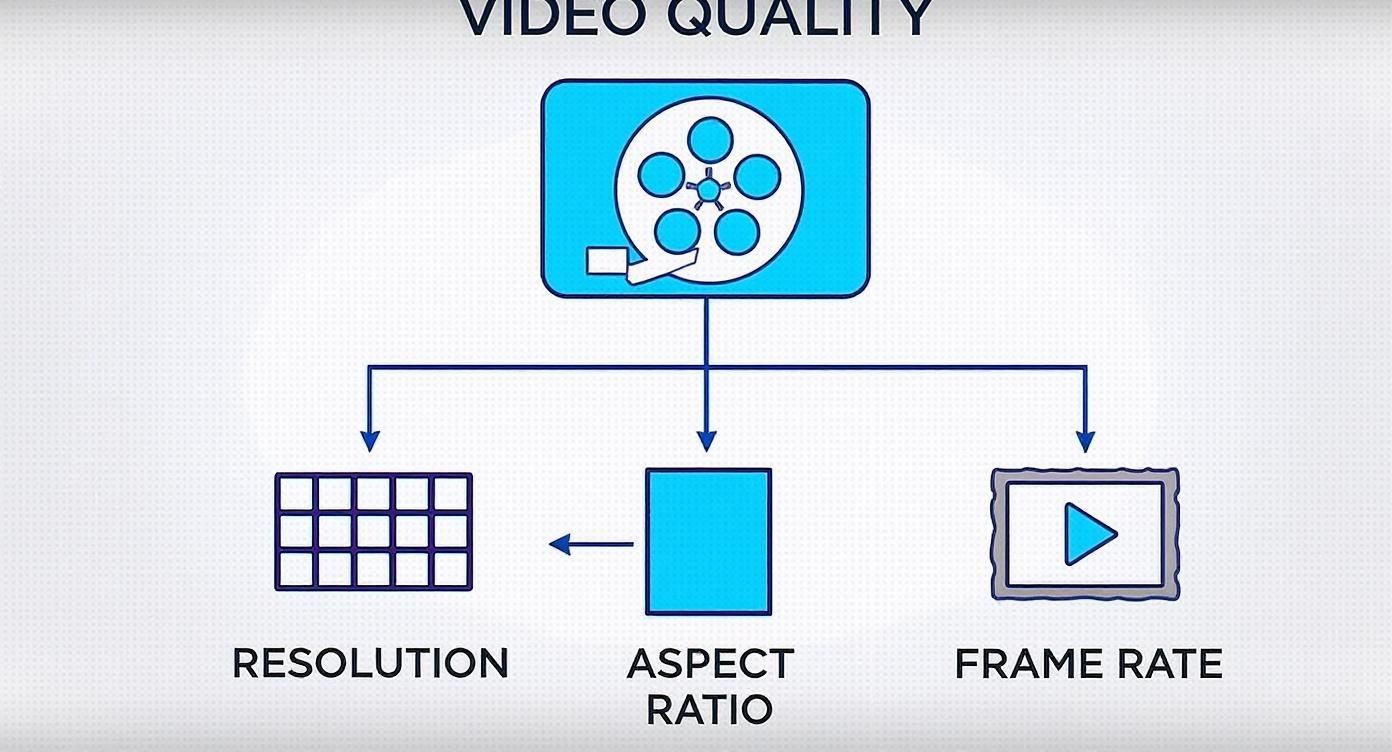
As you can see, resolution is a huge piece of the puzzle, but it’s directly supported by the video's shape (aspect ratio) and its smoothness (frame rate). To make sense of it all, let's break down the most common standards you'll encounter.
Comparing Video Resolution Standards
To give you a clearer picture, here’s a quick rundown of the most common video resolutions, what they're called, and where they shine. Think of this as your cheat sheet for picking the right tool for the job.
This table shows the clear progression—each standard offers a significant jump in pixel count, which translates directly to a sharper, more detailed image. Now let's dig into what that means in practice.
720p: The HD Starting Point
You’ll often see 720p referred to as standard HD (High Definition), with a resolution of 1280x720 pixels. It might feel a bit dated now, but it was a massive leap from the old Standard Definition (SD) video we grew up with. It still provides a clear, perfectly watchable image that doesn’t require a ton of bandwidth.
This makes 720p a smart choice when file size and loading speed are your top concerns. It’s great for live streams where viewers might have spotty internet, or for quick social media ads that need to load instantly. Honestly, on a small phone screen, most people can't tell the difference between 720p and 1080p, making it a very efficient option for mobile-first content.
1080p: The Versatile Workhorse
Also known as Full HD (FHD), 1080p clocks in at 1920x1080 pixels. For a long time, this was the undisputed king of online video, and for good reason. It hits the sweet spot, striking an almost perfect balance between fantastic quality and manageable file sizes.
1080p delivers a crisp, detailed image that looks great on almost anything—from smartphones to monitors and even mid-sized TVs. It’s the default standard for a huge range of content:
- YouTube Videos: The vast majority of creators upload in 1080p. It gives viewers reliable quality without endless buffering.
- Corporate Content: Training videos, webinars, and company announcements look sharp and professional in Full HD.
- Social Media: Even with vertical formats, 1080p (or its vertical twin, 1080x1920) is the quality benchmark for polished content on Instagram, Facebook, and LinkedIn.
When in doubt, 1080p is your safest bet. It ensures your video looks professional on nearly every platform without creating gigantic files that are a pain to store, edit, and upload.
1440p: The Gamer’s Choice
Known as Quad HD (QHD), 1440p resolution measures 2560x1440 pixels. Why "Quad"? Because it packs four times as many pixels as a 720p HD screen. You’ll find this resolution most often on high-end computer monitors, especially those built for gaming.
If you create content in the gaming world, exporting in 1440p is often expected by your audience. It does a much better job of capturing the incredible detail in modern game graphics, giving viewers a sharper and more immersive experience. While it's less common for other types of video, it's a fantastic middle ground for creators who want to offer a bump in quality over 1080p without jumping into the deep end with 4K.
4K: The New Gold Standard
Officially called Ultra HD (UHD), 4K resolution is a beast, packing in 3840x2160 pixels—a whopping four times the pixel count of 1080p! This is where video quality starts to feel truly cinematic, with incredible depth, clarity, and detail. Once a rare luxury, 4K is now the standard for new TVs, streaming platforms like Netflix, and any serious video production.
Shooting and exporting in 4K is a great way to future-proof your content. Even if most people watch your video in 1080p today, having that 4K master file means you’re ready as displays and viewer expectations evolve. It also gives you amazing flexibility in editing—you can crop, reframe, or punch in on a shot without any noticeable drop in quality.
But be warned: the leap to 4K comes with some heavy baggage. The file sizes are enormous, demanding serious storage space and a powerful computer to edit smoothly.
8K: The Cutting Edge
At a mind-boggling 7680x4320 pixels, 8K resolution is the current peak of consumer video technology. The level of detail is almost unbelievable, but its practical use is still extremely limited. Very few people actually own 8K displays, and there’s hardly any native 8K content out there to watch on them.
For now, 8K lives in specialized fields like high-end cinematography, professional VFX, and flashy tech demos. While it's an exciting peek into the future, it's simply not a practical standard for the vast majority of creators today.
How Your Resolution Choice Bleeds Into Your Workflow
Picking a video resolution feels like a creative decision, but it’s one that will echo through your entire production process. It’s not just about how sharp the final video looks; it’s a deeply practical choice with huge consequences for your budget, timeline, and maybe even your sanity.
Think of it as a constant balancing act between your grand creative vision and the cold, hard limits of your gear and resources. Each jump in resolution—say, from 1080p to 4K—doesn't just add more pixels; it multiplies them. This creates a ripple effect that starts the very second you hit the record button.
The Heavy Cost of High-Resolution Files
The first, and most immediate, consequence of shooting in high resolution is the staggering increase in file size. A 4K video file packs in four times the pixel data of a 1080p file, and that means it eats up way more storage space. This isn't some minor inconvenience; it's a genuine logistical headache.
Just a few minutes of 4K footage can easily swallow gigabytes of data, torching through memory cards on set and filling up hard drives back at your desk. This starts a real domino effect:
- Storage Costs: You'll need bigger, faster, and more expensive hard drives or cloud plans to keep your project files safe.
- Transfer Times: Moving those monster files from a camera to a computer, or sending them to a collaborator, can drag on for hours instead of minutes.
- Backup Strategy: Archiving a 4K project demands a much beefier and pricier backup plan if you want to protect your work.
Getting a handle on how resolution and file size are linked is crucial. For a deeper dive, our guide on video file formats explained breaks down how different containers and codecs wrangle all this data.
The Demands on Your Computer and Gear
Once you’ve wrangled those massive files onto your computer, the real test begins. Editing high-resolution video is one of the most punishing tasks you can throw at a machine. The sheer volume of data that has to be processed for every single frame can bring even a beastly computer to its knees.
Editing 4K or 8K footage demands a serious investment in processing power. If you don't have it, you're signing up for frustrating lags, choppy playback, and export times that feel like an eternity.
A powerful CPU, tons of RAM, and a dedicated graphics card aren't just nice-to-haves for a high-res workflow—they're absolute essentials. Trying to cut 4K on a machine that can't handle it will turn your creative process into a technical nightmare.
And this strain isn't just limited to editing. Every single part of your workflow feels the pressure, from applying color grades and visual effects all the way to that final render.
Bandwidth for You and Your Audience
Finally, you have to think about how your video will actually get to your audience. High-resolution video needs a strong internet connection—not just for you to upload it, but for your viewers to stream it without that dreaded buffering wheel. Your 4K masterpiece might look incredible, but it's worthless if your audience’s internet can only handle 720p.
This is especially critical for live streaming, where a stable, high-speed connection is completely non-negotiable for delivering a crisp, uninterrupted feed. For pre-recorded stuff, platforms like YouTube will automatically create lower-res versions, but your initial upload of that giant 4K file can still be a painfully slow ordeal.
When you’re prepping your content for different platforms, using the right video resizing tools can be a lifesaver. It helps you hit that sweet spot of great quality without creating files that are too chunky for your audience to stream. Ultimately, a smart distribution strategy is all about balancing ideal video resolution with real-world accessibility.
Matching Your Resolution to the Platform

Here’s the single biggest mistake creators make with video resolution: assuming higher is always better. It’s a common trap. But the reality is, the "best" resolution isn't a fixed number. It’s the one that’s perfectly tuned for the platform where your audience is actually watching.
A stunning 4K masterpiece loses all its power when it gets awkwardly cropped, compressed to oblivion, or displayed on a tiny vertical screen. It’s like trying to fit a square peg in a round hole.
Instead of just chasing the highest numbers, the real goal is to match your video's specs—its resolution and aspect ratio—to the viewing environment. Every social platform is its own little world with its own set of rules. To win, you have to play by those rules.
When you tailor your content, it looks native and professional. It seamlessly blends into a user's feed instead of screaming, "I was made for somewhere else!"
YouTube: Your Digital Stage
Of all the major platforms, YouTube is the most flexible. It can handle a huge range of resolutions and aspect ratios, but its heart and soul is the classic widescreen 16:9 format.
For years, 1080p (1920x1080) has been the go-to standard for YouTube. It delivers fantastic quality without demanding too much bandwidth from your viewers. It just works.
But there’s a pro move to consider. YouTube's algorithm tends to reward higher-resolution uploads. When you upload in 4K (3840x2160), even if most people watch in 1080p, the final result often looks sharper. This is because YouTube uses a more efficient codec (VP9) for 4K videos, which means the downscaled 1080p version looks crisper than a video that was uploaded in 1080p to begin with.
Key Takeaway: For YouTube, uploading in 4K is a great way to future-proof your videos and get a slight quality edge. If your workflow can't handle 4K, don't sweat it—1080p is still a fantastic and widely accepted standard.
TikTok and Instagram Reels: The Vertical Revolution
Welcome to the world of vertical video. On platforms like TikTok and Instagram Reels, the screen is the phone, and the orientation is non-negotiable. Success here is built on a 9:16 aspect ratio.
The optimal resolution is 1080x1920. This fills the entire mobile screen, creating an immersive experience that grabs a user's attention instantly. Anything else will leave you with ugly black bars or awkward cropping, which is a dead giveaway of low-effort content.
- TikTok: The algorithm loves full-screen, immersive video. You should always export at 1080x1920 for maximum reach.
- Instagram Reels: Just like TikTok, Reels are designed for the vertical 9:16 format. Use 1080x1920 to make sure your video looks polished.
- Instagram Stories: The same exact rules apply here. Stories are a vertical-first experience, making 1080x1920 the only resolution you should ever use.
There’s very little wiggle room on these platforms. A horizontal video squeezed into a vertical frame is a guaranteed way to lose your audience.
Facebook and Instagram Feed: A More Flexible Space
The main feeds on Facebook and Instagram give you a bit more breathing room, but remember, mobile viewing is still king. While you can post standard 16:9 widescreen videos, they often look small and get lost in the endless vertical scroll.
Square (1:1) and vertical (4:5) aspect ratios perform way better here. A 4:5 video (1080x1350) is often seen as the sweet spot for feed content. It takes up much more screen real estate than a square or widescreen video, commanding more attention without forcing users to turn their phones sideways.
If you want a complete breakdown of the best dimensions for every platform, check out this ultimate social media video sizes guide for 2025 to keep your content perfectly formatted. Creating platform-specific versions of your video isn't extra work—it's essential work for getting the biggest impact everywhere you post.
Common Questions About Video Resolution
Even after you get the hang of the basics, video resolution can throw some curveballs your way. Let's dig into a few of the most common questions that pop up, so you can make smarter decisions on your next project. We'll build on what we've already covered and give you some practical advice for real-world situations.
Think of this as your go-to guide for those nagging "what-if" moments that always seem to strike right before you hit export.
Can I Upload a 4K Video to a 1080p Platform?
You bet. In fact, you probably should if you have the option.
Most modern platforms like YouTube are built to handle this. When you upload a 4K video, the platform automatically creates smaller versions, including a 1080p stream for viewers who select it. But here’s the cool part: that 1080p version often looks better than a video that was 1080p to begin with.
This process is sometimes called supersampling. The platform uses all that extra pixel data from your 4K file to create a sharper, more detailed 1080p version. The difference can be subtle, but you’ll often notice it in fine textures and crisp edges.
Just remember the trade-off. 4K files are huge. They take a lot longer to upload and process, so you have to decide if that slight boost in quality is worth the extra time and data.
Is Bitrate More Important Than Resolution?
Ah, the classic debate. The truth is, they're a team—one can't really shine without the other. It's not about which one is "more important," but how well they're balanced. A common mistake is thinking a high number for one can make up for a low number on the other.
Here’s a simple analogy: think of resolution as the size of a bucket and bitrate as the amount of water you pour into it.
- A massive 4K bucket (high resolution) with just a trickle of water (low bitrate) is going to look awful. You’ll get a blocky, pixelated mess that completely wastes the potential of 4K.
- On the other hand, a smaller 1080p bucket (lower resolution) that’s filled to the brim with water (high bitrate) can look incredibly clear, smooth, and professional.
For fast-moving content like sports or action sequences, a higher bitrate is absolutely critical to avoid ugly motion artifacts. But for a slow, detailed shot like a landscape, the benefits of higher resolution become much more obvious. The real goal is to find the sweet spot for the kind of video you’re making.
What Is the Difference Between 1080p and 1080i?
This is a really important one that separates modern video from old-school broadcast tech. That little "p" or "i" tells you how the image is actually drawn on the screen.
1080p (Progressive Scan): This is the modern standard. In a progressive scan, every single line of the video frame is drawn one after another, from top to bottom, for every single frame. This gives you a solid, stable image that’s perfect for the crisp video we see online and on new TVs.
1080i (Interlaced Scan): This is an older trick used for broadcast TV to save on bandwidth. An interlaced scan only draws half the image at a time—first the odd-numbered lines, then the even-numbered lines. It happens so fast your brain pieces it together, but it can create noticeable jagged edges or "combing" artifacts, especially during fast motion.
For pretty much anything you create today—for the web, social media, or any digital screen—1080p is always the right choice. The "i" in 1080i is a relic from a different era. You'll almost never need to export in an interlaced format, so just stick with progressive.
Juggling all these resolution variants for different platforms can be a huge time-sink. With Aeon, you can automate the whole process, generating perfectly formatted, platform-ready versions for every channel without all the manual grunt work. Learn how Aeon can streamline your video workflow.